Security software · Buyer’s guide
Norton AntiVirus Plus reviewed: what the entry-level plan actually covers
Advertising disclosure and independence
This article is published by Bond-Art-Eko s.r.o. and funded by advertising. The buttons on this page are partner links. If you buy a subscription after following one, we receive a commission from the advertiser. You pay no more than you otherwise would, and the commission has no bearing on what is written here.
We are not Norton. pravator.online is not affiliated with, endorsed by or sponsored by Gen Digital Inc. Nothing here is a quotation, an offer or a contract: the vendor’s own product page, pricing and terms prevail over anything on this page, including where the two diverge because the vendor has changed something since we last checked.
Norton AntiVirus Plus is the cheapest paid tier in Norton’s consumer range. It is also the one most often described inaccurately, because the features people associate with the Norton brand — the VPN, the dark-web monitoring, the five-device licence — are not in it. This page sets out what the entry tier does include, what it does not, and what to check on Norton’s own site before paying.
What Norton AntiVirus Plus is, and where it sits in the range
Norton is a consumer security brand owned by Gen Digital Inc. Its consumer line-up is a ladder: Norton AntiVirus Plus at the bottom, then Norton 360 Standard, Norton 360 Deluxe, and larger family and identity-protection bundles above those. Each rung adds features rather than making the malware engine better — the core detection engine is, as far as Norton’s own documentation describes it, shared across the range.
That matters when you are choosing. If your reason for buying is purely “scan my one laptop for malware”, the entry tier is the relevant product. If your reason is “I want a VPN” or “I want to be told if my email address turns up in a breach dump”, the entry tier is the wrong product and you will be disappointed by it.
What is included at this tier — and what is not
According to Norton’s published consumer product pages at the time of writing, Norton AntiVirus Plus covers one device — a single PC or a single Mac — and includes real-time protection against malware, ransomware, spyware and phishing sites, a firewall (marketed as Smart Firewall on Windows), Norton Password Manager, and a small allowance of cloud backup for Windows. Norton also attaches its “Virus Protection Promise” to paid subscriptions, a refund undertaking that is subject to its own terms and conditions.
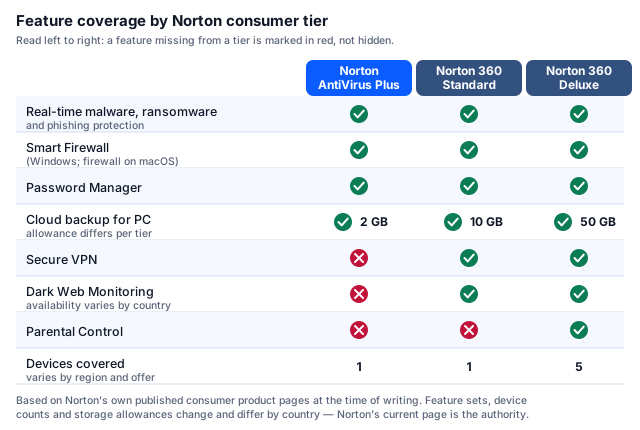
| Feature | AntiVirus Plus | 360 Standard | 360 Deluxe |
|---|---|---|---|
| Real-time malware, ransomware and phishing protection | Yes | Yes | Yes |
| Firewall | Yes | Yes | Yes |
| Password Manager | Yes | Yes | Yes |
| Cloud backup (Windows only) | Yes, smallest allowance | Yes, larger | Yes, largest |
| Secure VPN | No | Yes | Yes |
| Dark Web Monitoring | No | Yes, where offered | Yes, where offered |
| Parental Control | No | No | Yes |
| Devices covered | 1 | Typically 1 | Typically 5 |
The short version
Norton AntiVirus Plus is a single-device malware and firewall product with a password manager attached. It is not a bundle. If a page tells you the entry tier includes a VPN or identity monitoring, that page is wrong.
Norton AntiVirus Plus — current offer
Norton’s entry-level single-device plan. Check the current price, the renewal price and the term length on Norton’s own page before you commit.
See Norton AntiVirus PlusPartner link · advertisementPartner link. If you buy after following this link, pravator.online receives a commission from the advertiser. It costs you nothing extra, it does not change the price you are shown, and it does not change what is written above it.
What we corrected on this page
An earlier version of this article, published on this domain before our editorial review, made several claims we could not support. We have corrected them rather than quietly deleting them, because readers who acted on the earlier version deserve to know what changed:
- It said Norton AntiVirus Plus “includes features like a secure VPN and identity theft protection”. It does not. Secure VPN and Dark Web Monitoring appear from Norton 360 Standard upwards.
- It said the product offers “multi-device protection … PC, Mac, or mobile … under a single subscription”. The entry tier is a one-device licence. Multi-device cover is a higher tier.
- It said the software “monitors the dark web for your personal information and alerts you”. Not at this tier.
- It asserted the product was “the best choice” and “a top choice”. We have removed the superlatives: we have not run comparative laboratory tests ourselves and have no basis for ranking it first.
- It was framed as a “reader story” and a “reader-submitted” account. It was not. It was advertising copy. The framing has been removed, along with the site-wide “Reader Stories” label.
- It described the detection engine as using “advanced AI and machine learning” as a distinguishing claim. Machine-learning components are ordinary across the industry and we cannot verify Norton’s internals, so the claim is now described, not asserted.
If you spot a further error, please write to info@pravator.online. Our corrections procedure explains what happens next.
How antivirus detection actually works
“Antivirus” is a single word for at least four different techniques running at different moments. Understanding the difference is what lets you judge a claim like “blocks zero-day threats” instead of simply believing it.
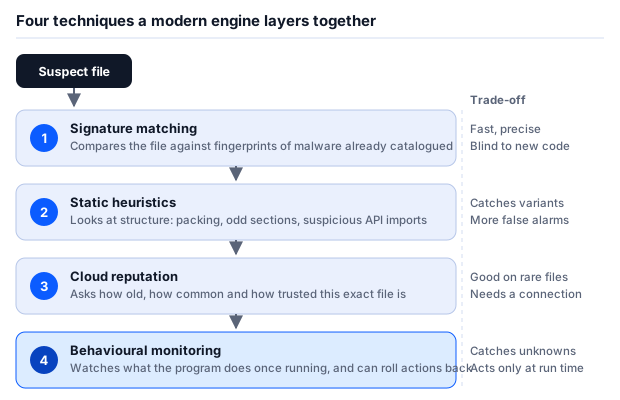
Signature matching
The oldest layer. The engine holds fingerprints of files already catalogued as malicious and compares what it sees against them. It is fast and it produces very few false alarms. Its weakness is structural: a file that has never been catalogued has no fingerprint, so signature matching alone cannot see it.
Static heuristics
Instead of asking “have I seen this exact file?”, heuristics ask “does this file look like the kind of thing malware is?” — is it packed or obfuscated, does it import the system functions used for keylogging or process injection, does its structure disagree with its file extension. This catches variants of known families. It also produces more false positives, which is why engines weight it rather than trust it outright.
Cloud reputation
The engine asks a central service how old this exact file is, how many other machines have run it and whether it is digitally signed by a known publisher. A file seen on millions of machines for three years behaves differently in this model from one created eleven minutes ago and seen on four machines. This layer is unusually good at newly minted malware — and it needs an internet connection to work.
Behavioural monitoring
The last line. Rather than judging the file, the engine watches the running process: is it enumerating documents and rewriting them at speed, is it deleting shadow copies, is it talking to an address associated with command-and-control traffic. Ransomware is largely caught here, and some products can roll back the changes a blocked process made. The trade-off is that behavioural detection only fires once something is already executing.
Why this matters to a buying decision
No vendor, Norton included, can honestly promise a 100 % detection rate, because layers three and four are probabilistic by construction. Any page that promises you total protection is selling, not informing. The realistic question is not “does it catch everything” but “how does it score in repeated independent testing, and how many false alarms does it generate while doing it”.
How malware actually reaches a home computer
Most home infections do not involve an exotic exploit. They involve a person being persuaded to open something. The delivery routes below account for the overwhelming majority of consumer cases described in the annual threat reporting published by ENISA, the European Union Agency for Cybersecurity, and by Europol.
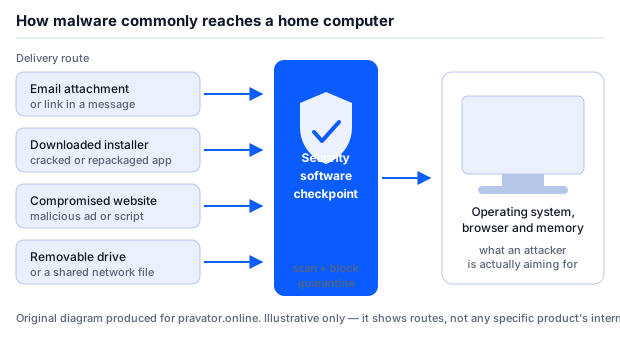
- Email attachments and links. Still the single most common consumer route. The attachment is usually a document that asks you to enable content, or an archive containing a script.
- Downloaded installers. Cracked software, “free” codec packs and repackaged versions of legitimate installers distributed through search advertising.
- Compromised or malicious websites. Including malicious advertising served into otherwise reputable sites, and fake browser-update prompts.
- Removable drives and shared files. Less common at home than it was, but still the route for worms that spread across a shared network drive.
The fake “your antivirus has expired” email
Security software is itself a phishing lure. Renewal emails are expected, they carry a payment link, and they create anxiety — which is exactly the combination an attacker wants. The message below is invented for teaching purposes, with fictitious addresses, but its structure is the one these messages reliably use.
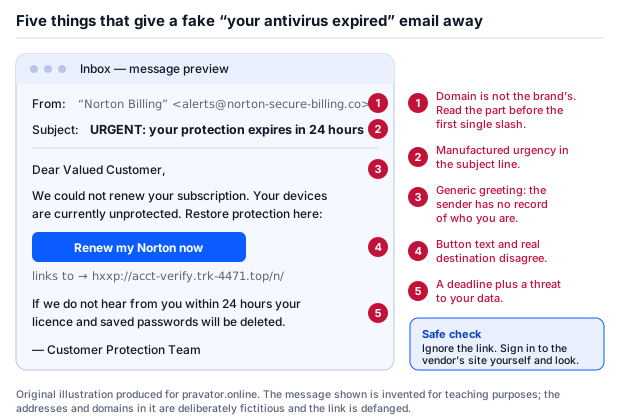
The single habit that defeats all five of these signals at once: never renew from a link in an email. Open a new tab, type the vendor’s address yourself or use your own bookmark, sign in, and look at your subscription there. If the renewal notice was genuine you will see it. If you see nothing, it was not.
Check the offer on Norton’s own site
Following this link takes you to the advertiser. We do not take payment details and we never ask you for them.
Go to the advertiserPartner link · advertisementPartner link. If you buy after following this link, pravator.online receives a commission from the advertiser. It costs you nothing extra, it does not change the price you are shown, and it does not change what is written above it.
Platforms and system requirements
Norton AntiVirus Plus is a desktop product: Windows and macOS. Norton publishes the current minimum operating-system versions, memory and disk requirements on its own support pages, and changes them as it drops support for older releases. We are deliberately not reproducing version numbers here, because a stale requirements list is worse than no list. Two things are worth checking yourself before you pay:
- That your operating system version is still supported. Support for older Windows and macOS releases is withdrawn on Norton’s schedule, not yours.
- Which features are Windows-only. Cloud backup in particular has historically been a Windows feature. If you are buying for a Mac, confirm what you actually receive.
Price, automatic renewal and cancellation — read this before buying
Consumer security software is almost always sold on an introductory price for the first term, with automatic renewal at the standard price afterwards. This is legal and it is disclosed, but it is disclosed in the small print, and the difference between the two prices is frequently large.
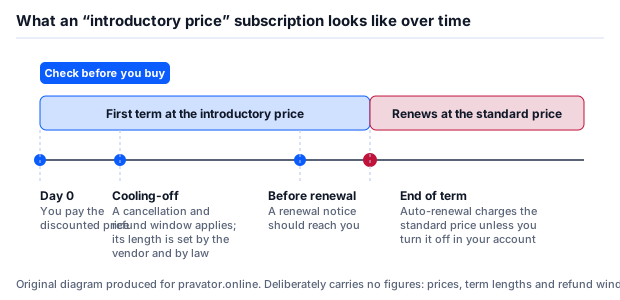
Before you enter card details, find and read the following four things on the vendor’s own checkout page:
- The renewal price, not just the first-term price. It is normally stated next to the introductory price or one click away in the terms.
- The term length — whether you are buying twelve months or something else.
- How to switch automatic renewal off, and where in your account that setting lives. You can usually do it immediately after purchase and keep the term you paid for.
- The refund window and how to invoke it. If you are buying from within the EU, be aware that the statutory fourteen-day right of withdrawal for digital content can be lost once you agree to immediate delivery and acknowledge that loss — so the vendor’s own money-back policy is often the thing that actually protects you. Read it.
Our position on urgency
You will notice no countdown timer, no “3 people are viewing this” and no “offer ends tonight” anywhere on this site. Security software is sold at a discount more or less permanently. If an offer genuinely expires, another one appears. Nothing about your security posture requires you to buy within the next ten minutes.
Where to read independent test results — and why we quote none
Three European and British laboratories test consumer endpoint products on a published, repeated methodology, and all three publish results publicly and free of charge:
- AV-TEST (Magdeburg, Germany) — bi-monthly rounds scoring protection, performance and usability, the last of which is essentially a false-positive count.
- AV-Comparatives (Innsbruck, Austria) — including its Real-World Protection Test, run monthly over a long period, and its separate performance and false-alarm tests.
- SE Labs (United Kingdom) — quarterly reports using full attack chains rather than static sample sets.
We deliberately publish no scores from these laboratories on this page. A test result is tied to a specific product version, a specific month and a specific sample set; quoted out of that context on an affiliate page it becomes marketing. Results also move: a product that scored perfectly in one round may not in the next. Look the current round up yourself — it takes about two minutes, the reports are free, and what you find will be more current than anything we could freeze into this page.
What antivirus software does not do
This is the part that advertising leaves out, and it is the part that determines whether you actually stay safe.
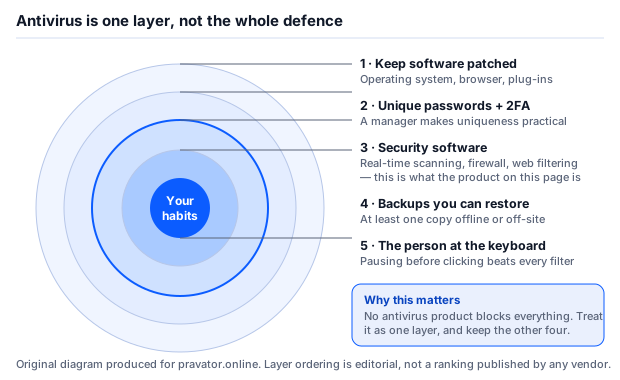
An antivirus product does not patch your operating system, does not make your passwords unique, does not stop you approving a login you did not initiate, and cannot recover files it failed to stop being encrypted. That last one is why backups matter more than any security suite you can buy.
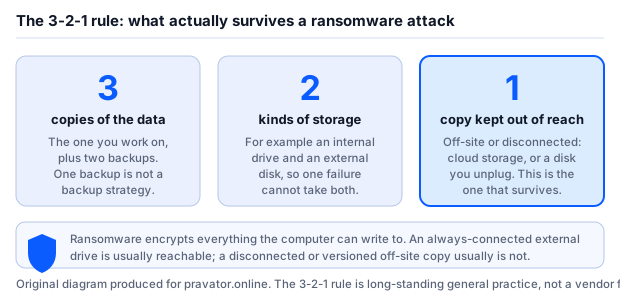
Ransomware encrypts everything the compromised machine can write to. An external drive that is permanently plugged in is usually reachable and usually gets encrypted with everything else. The copy that saves you is the one that was disconnected, or the one held somewhere with version history the attacker does not control. The cloud-backup allowance bundled with security suites is a small step in that direction; it is not by itself a backup strategy.
Who the entry tier suits, and who should look elsewhere
We are not going to award it a score out of ten. Here is the honest shape of the decision:
- It fits someone protecting a single Windows PC or Mac who wants real-time malware protection, a managed firewall and a password manager from an established vendor, and who is comparing it against other single-device antivirus products at a similar price.
- It does not fit someone who wants a VPN, breach monitoring, parental controls or cover for a household of phones and laptops. Those are the 360 tiers, and buying the entry tier expecting them will end in a support conversation.
- Consider the alternative of buying nothing. Windows ships with Microsoft Defender enabled by default, and macOS has XProtect and Gatekeeper. These are not placeholders; they are tested by the same laboratories listed above and they cost nothing. A paid product is a reasonable purchase if you want the additional components, vendor support or a single management surface — but “you are unprotected without it” is not true of a current, patched Windows machine, and we will not tell you it is.
If the entry tier is what you want
Confirm the device count, the platform support and the renewal price at the advertiser’s checkout before paying. Nothing on this page is an offer.
View the current Norton offerPartner link · advertisementPartner link. If you buy after following this link, pravator.online receives a commission from the advertiser. It costs you nothing extra, it does not change the price you are shown, and it does not change what is written above it.
Sources, method and the limits of this page
How this page was put together. Feature breakdowns come from the vendor’s own published consumer product and support pages. Descriptions of detection technique come from public technical literature and the published methodologies of the independent test laboratories. Statements about the threat landscape reflect the annual public reporting of ENISA and Europol. We ran no laboratory tests ourselves and we say so rather than implying otherwise.
- Norton consumer product and support pages (Gen Digital Inc.) — feature sets, device counts, platform support, subscription and refund terms.
- AV-TEST Institute, Magdeburg — published consumer product test methodology and results.
- AV-Comparatives, Innsbruck — Real-World Protection Test, performance and false-alarm test methodology and results.
- SE Labs, United Kingdom — quarterly consumer endpoint protection reports.
- ENISA (European Union Agency for Cybersecurity) — annual Threat Landscape reporting.
- Europol — Internet Organised Crime Threat Assessment (IOCTA).
Where information diverges, the publisher’s own information prevails. Feature sets, prices, device allowances and terms change without notice and differ between countries. If anything on this page contradicts what Norton or the retailer states at the point of sale, theirs is correct and ours is out of date. Tell us at info@pravator.online and we will fix it.
Trademark notice
Norton and Norton 360 are trademarks or registered trademarks of Gen Digital Inc. and/or its affiliates. pravator.online is an independent publication. It is not affiliated with, endorsed by, sponsored by or otherwise connected to Gen Digital Inc., NortonLifeLock or any of their affiliates. Product names are used for identification only.
Written by Sandra Moore. Published 22 September 2026. This page is reviewed at least every six months and after any change we become aware of in the product’s feature set. All diagrams on this page are original SVG artwork produced for pravator.online; no product screenshots, vendor artwork or stock photography are used.